
In WiFi Router, users will alwasy see three main networking modes in it: Router Mode, AP (Access Point) Mode, and Extender (Repeater) Mode. While Router Mode is always its default mode.
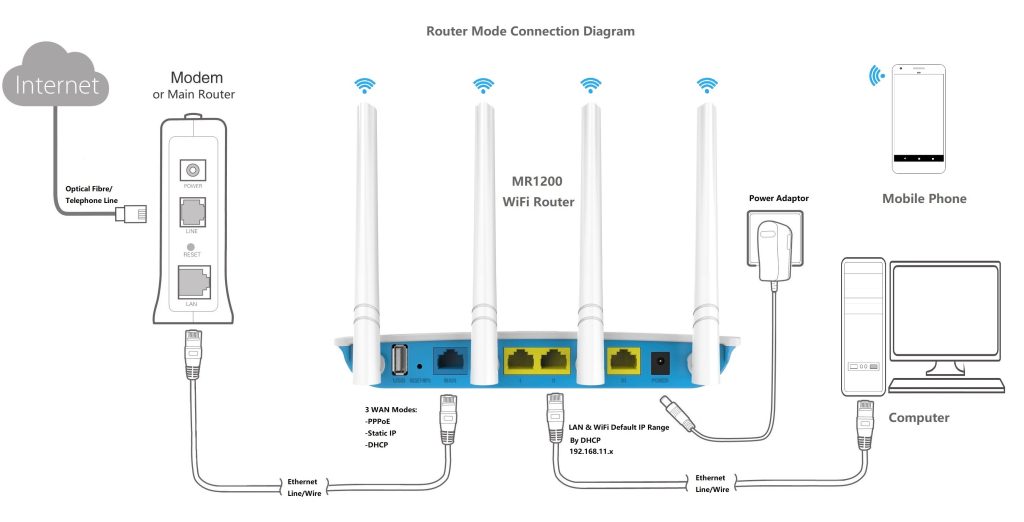
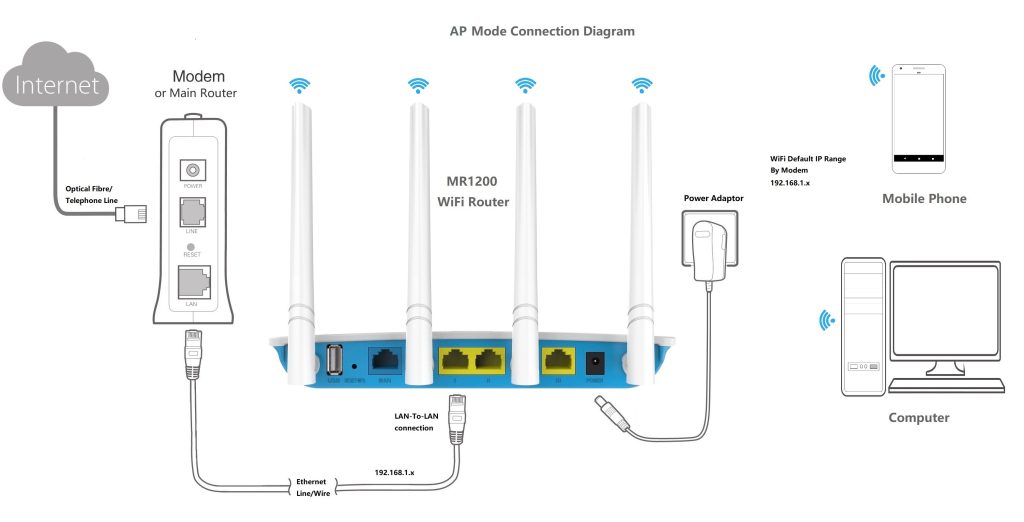
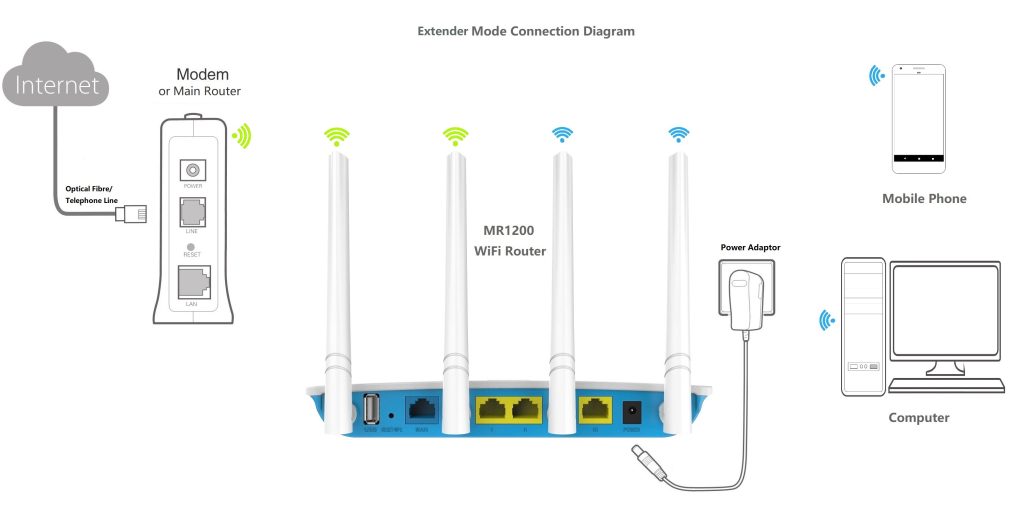
Here is a clear breakdown of the three main networking modes: Router Mode, AP (Access Point) Mode, and Extender (Repeater) Mode. Below network diagrams visually show you how the data flows and how the devices connect in each setup.
1. Router Mode (The “Brain” of the Network)
This is the default mode for most home networks. The router connects directly to your ISP’s modem (via a WAN port), creates its own private local network (LAN), and assigns IP addresses to all connected devices (phones, PCs, smart TVs). It acts as the gateway between the internet and your home devices.
2. AP Mode / Access Point Mode (The “Wi-Fi Creator”)
AP mode takes an existing wired internet connection and broadcasts it as a Wi-Fi signal. In this mode, the device turns off its routing functions (like assigning IP addresses or creating a firewall). It simply acts as a bridge, passing the network traffic from the wired cable to wireless devices. All devices connected to the AP will get their IP addresses from the main upstream router.
3. Extender Mode / Repeater Mode (The “Signal Booster”)
This mode is used to expand the coverage of an existing Wi-Fi network wirelessly. The device connects to your main router’s Wi-Fi signal and rebroadcasts it to reach “dead zones” (areas with no signal). It does not require an Ethernet cable to connect to the main router.
In Repeater mode, the device acts as a transparent bridge. It receives the wireless signal from the parent router (AP) and rebroadcasts it to extend coverage.
- DHCP: It does not provide its own DHCP service.
- IP Addressing: All connected devices get their IP addresses directly from the parent Wi-Fi AP.
- Subnet: Everything remains on the same subnet. The repeater is essentially “invisible” to the network topology. So this feature will be a shortage for user to find the Repeater device again because its IP is determined by its parent Wi-Fi AP or router dynamically.
- NAT & Firewall: NAT (Network Address Translation) is disabled, and there is no firewall protection between your devices and the parent network.
- Best for: Extending Wi-Fi coverage within your own home network where you want all devices to remain on the same LAN.
4. WISP (Wireless Internet Service Provider) mode
In WISP mode, the device acts as a full router. It connects to the parent Wi-Fi network via its WAN interface (wirelessly) and creates its own separate local network.
- DHCP: It does provide its own DHCP service.
- IP Addressing: Connected devices get their IP addresses from the WISP router, not the parent AP.
- Subnet: The WAN side (parent network) and LAN side (your devices) are on different subnets.
- NAT & Firewall: NAT is enabled, and a firewall sits between your devices and the upstream network, providing security.
- Best for: Connecting to public Wi-Fi (hotels, airports, cafes). It allows multiple devices to share a single public Wi-Fi connection while bypassing captive portals (login pages) and protecting your devices from other users on the public network.
In functions view point, WISP Mode looks like Repeater Mode, the differce is listed as below table.
| Feature | Repeater Mode | WISP Mode |
|---|---|---|
| Primary Function | Signal Extender (Bridge) | Wireless Router |
| DHCP Server | ❌ Disabled (uses parent’s) | ✅ Enabled (provides its own) |
| IP Address Source | Parent Wi-Fi AP | WISP Router |
| Network Topology | Single Subnet (same LAN) | Dual Subnet (WAN + LAN) |
| NAT & Firewall | ❌ Disabled | ✅ Enabled |
| Security | Lower (exposed to parent network) | Higher (isolated by firewall) |
| Ideal Use Case | Home Wi-Fi extension | Public/Hotel Wi-Fi sharing |


