
1. What Problem Is Roaming Actually Solving?
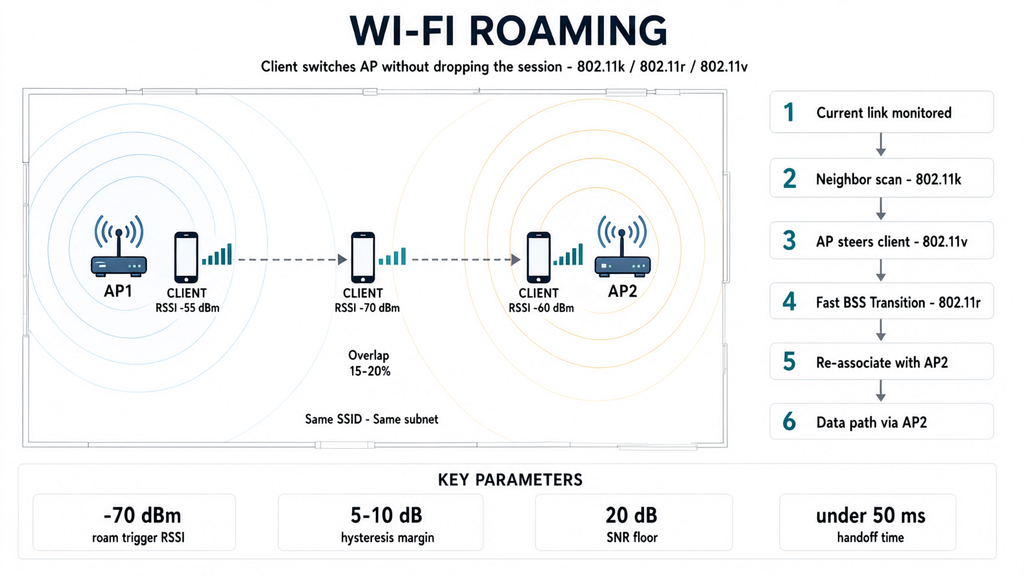
When your device (STA) moves from AP1 coverage area into AP2 coverage area, it needs to “disconnect from AP1 and connect to AP2.” This process is called roaming.
Three core problems:
- Who makes the roaming decision? — It’s the client, not the AP. An AP cannot directly command a client to switch to another AP (except via 802.11v). This means “the smart AP actively helps you roam” is not entirely true under the standard protocols.
- Sticky clients — A device holds onto a distant AP even when its signal has dropped very low, refusing to switch. This is the most common roaming problem and directly destroys throughput.
- Handoff interruption — During the time the client scans channels and re-authenticates (4-way handshake), the data flow is interrupted. Video call stuttering, game disconnections, and voice breakups all happen in these tens to hundreds of milliseconds.
2. “Naked” Roaming Without 802.11k/v/r
2.1 Traditional Roaming Flow (802.11 Baseline)
① Client detects current AP's signal weakening (RSSI drops below threshold, typically -70 to -75 dBm)
② Client decides "I need to roam"
③ Client begins scanning all channels:
  -active scan: sends Probe Request and waits for replies
  -passive scan: silently listens for Beacons
④ Picks the AP with the best signal from scan results
⑤ Initiates Authentication → Association
⑥ Re-runs the 4-way handshake, establishes new PTK
⑦ Continues data transmission
Typical timing for this flow:
- Scanning: 100–500 ms (depends on channel count, whether every channel must be scanned)
- Authentication + Association: a few milliseconds
- 4-way handshake: ~50–100 ms
Total: typically 200–600 ms of interruption. Unnoticeable for web browsing, but catastrophic for VoWiFi (Wi-Fi calling), video conferencing, and online gaming.
2.2 Key Pain Points
| Pain Point | Cause |
|---|---|
| Long scan time | Client has no idea which APs are nearby, so it must scan every channel |
| Sticky clients | Roaming thresholds vary by vendor; some hold on to -80 dBm before switching |
| Slow re-authentication | Every switch requires a full 4-way handshake; WPA-Enterprise adds a RADIUS round-trip |
| No load balancing | Clients may all crowd onto the strongest AP while adjacent APs sit idle |
3. 802.11k — Giving the Client a “Map”
802.11k-2008, full name Radio Resource Measurement (RRM).
3.1 Core Mechanism
802.11k lets APs provide clients with information about nearby APs, so the client doesn’t need to blindly scan all channels.
| Capability | Description |
|---|---|
| Neighbor Report | AP tells the client: “These APs are around you — BSSID is XX:XX:XX:XX:XX:XX, operating on channel N.” The client then scans only those channels, not all 25 channels on 5 GHz |
| Beacon Report | AP requests the client to report signal strengths of other APs it hears, used to optimize the network |
| Link Measurement | Evaluates current link quality, assisting roaming decisions |
| Channel Load Report | Reports channel utilization (how many devices are using it) |
3.2 Practical Impact
- Scan time drops from 200–500 ms to 20–50 ms (from scanning all channels to scanning only a few)
- Client can find a “better AP” faster
- But 802.11k does not make the roaming decision — it only gives the client fuller information; the decision is still the client’s to make
3.3 One-Line Summary
802.11k = giving the client a map of nearby APs, so it knows where to go.
4. 802.11v — Letting the AP “Push” the Client
802.11v-2011, full name BSS Transition Management.
4.1 Core Mechanism
802.11v lets an AP actively request that a client switch to another AP.
| Capability | Description |
|---|---|
| BSS Transition Management Request (BTM) | AP sends a request to the client: “Please switch to AP-X, reason is YY.” Client can accept or refuse |
| BSS Transition Management Query | Client proactively asks the AP: “Where should I roam?” |
| BSS Max Idle Period | AP tells the client: “If you have no traffic for X seconds, I’ll disconnect you” — prevents sticky clients from lingering indefinitely |
| Directed Multicast Service | Optimizes multicast forwarding, reduces power consumption |
4.2 Practical Impact
- Solves sticky clients — AP detects a client with weak signal and can send a BTM request to move it along
- Load balancing — AP finds itself overloaded and can BTM some clients to a neighbouring idle AP
- But the client can refuse — 802.11v is a “request,” not a “command.” Some clients simply won’t leave, and the AP has no recourse (unless it resorts to more aggressive deauth, which degrades experience)
4.3 One-Line Summary
802.11v = the AP can “suggest” the client move house; the client can choose to listen or not.
5. 802.11r — Making Re-Authentication Fast
802.11r-2008, full name Fast BSS Transition (FT).
5.1 Core Mechanism
802.11r solves the problem of re-authentication being too slow. By pre-deriving keys, it lets the client prepare encryption keys before it has even fully connected to the new AP.
| Capability | Description |
|---|---|
| PMK Caching | Client and target AP pre-share key material (PMK-R0, PMK-R1) via the R0KH/R1KH mechanism |
| Over-the-Air FT | Client begins the 4-way handshake with the new AP while still connected to the old one |
| Over-the-DS FT | Handshake frames are forwarded through the wired backbone (Distribution System), further reducing airtime |
5.2 Practical Impact
- Re-authentication time drops from ~100 ms to ~20 ms
- Critical for VoWiFi (Wi-Fi calling) — voice calls cannot tolerate >50 ms of interruption
- Also benefits video conferencing and online gaming
5.3 Known Issues
- Some older clients refuse to connect to APs with 802.11r enabled — they see the FT flag and think “this isn’t regular WPA2, I don’t recognize it,” and simply don’t connect. Especially problematic on some older Android devices and older IoT devices
- In deployments with many non-FT-capable devices, you may need to disable 802.11r or provide a separate SSID
5.4 One-Line Summary
802.11r = pre-prepare the keys so the re-authentication during handoff drops from 100 ms to 20 ms.
6. The Combination: k + v + r = “Seamless Roaming”
| Standard | Problem Solved | Who Decides | Who Executes |
|---|---|---|---|
| 802.11k | Client doesn’t know which APs are nearby | Client | AP provides information |
| 802.11v | Client is sticky, refuses to switch | AP suggests | Client decides whether to accept |
| 802.11r | Re-authentication too slow | — | Protocol-level optimization |
6.1 Ideal Flow with All Three Working Together
① Client detects current AP1's signal weakening
② Client receives a Neighbor Report from the AP (802.11k), learns AP2 and AP3 are nearby
③ Client scans only the channels for AP2 and AP3, gets signal strengths in a few milliseconds
④ AP1 notices client has weak signal, sends BSS Transition Request (802.11v) suggesting switch to AP2
⑤ Client accepts the suggestion, begins associating with AP2
⑥ Because keys were pre-derived via FT (802.11r), Over-the-Air handshake completes in a few milliseconds
⑦ Client continues data transmission, interruption time < 50 ms
7. Vendor Terminology Mapping
Different vendors call this set of protocols by different names, which causes confusion:
| Vendor | Term | Actual Meaning |
|---|---|---|
| Apple | “802.11k/v/r” | Explicitly supports all three |
| Ubiquiti (UniFi) | “Fast Roaming” | Usually means 802.11r, sometimes includes k/v |
| TP-Link / Aruba / Ruckus | “Seamless Roaming” / “Fast Transition” / “Fast Roam” | Usually a combination of k+v+r |
| Cisco | “ClientLink” / “Cisco Client Extensions (CCX)” | Partial proprietary optimizations + standard protocols |
| Consumer Mesh (eero, Orbi, Google WiFi) | “Seamless Roaming” / “Mesh Roaming” | Typically implements k/v/r, but settings UI often hides the options |
7.1 Commonly Confused Concepts
- Band Steering — Pushes clients from 2.4 GHz to 5 GHz; unrelated to roaming
- Mesh Backhaul — The link between APs; a separate concern from client roaming
- 802.11s — The mesh networking standard (wireless backhaul between APs); unrelated to k/v/r
8. Practical Deployment Considerations
Client Support Status (as of 2026)
| Client Type | 802.11k | 802.11v | 802.11r |
|---|---|---|---|
| Apple (iPhone 6+, Mac) | ✅ Good | ✅ Good | ✅ Good |
| Android (Qualcomm) | ✅ Mostly supported | ✅ Mostly supported | ⚠️ Some older devices have bugs |
| Android (MediaTek) | ⚠️ Inconsistent | ⚠️ Inconsistent | ⚠️ Inconsistent |
| Windows laptops | ✅ Mostly supported | ✅ Mostly supported | ✅ Mostly supported |
| Old IoT (smart plugs, old printers) | ❌ Typically unsupported | ❌ Typically unsupported | ❌ May refuse to connect |
| New IoT (Matter/Thread devices) | ✅ Typically supported | ✅ Typically supported | ⚠️ Depends on implementation |
8.1 Deployment Recommendations
- If your network has many legacy/IoT devices:
- Consider running dual SSIDs: one with k/v/r enabled for primary devices, one pure WPA2 for IoT
- Or simply disable 802.11r and keep only k/v (most devices are compatible)
- If your network is pure Apple/modern devices:
- Enable all three (k/v/r) for best experience
- Mesh systems typically enable k/v/r by default, but the settings UI may not expose the toggles. If your Mesh has IoT devices failing to connect, check whether there’s a “Fast Roaming” toggle you can temporarily disable for diagnosis.
- Enterprise APs (Cisco, Aruba, Ruckus) usually have their own proprietary roaming optimizations on top of the standard protocols (e.g., Cisco ClientLink), delivering better results than the standards alone — but require clients to also support the corresponding proprietary protocol.
9. Common Misconceptions
“Enabling 802.11k/v/r means seamless roaming.” ❌ All three require client cooperation. If the client doesn’t support 802.11v, the AP can’t push it; if it doesn’t support 802.11r, the switch will still be slow. “Seamless” is the ideal state, not a guarantee.
“802.11r is the same as 802.11k/v.” ❌ These are three independent standards solving different problems. 802.11r only handles re-authentication speed; k handles information provision; v handles AP-driven steering.
“Mesh systems don’t need 802.11k/v/r.” ❌ Mesh systems need these three most of all. The “seamless roaming” marketing claims behind mesh products rest on k/v/r protocol implementations.
“Stronger signal is always better, no need to roam.” ❌ If a client clings to a distant AP at -75 dBm while a nearby AP at -40 dBm sits unused, overall network efficiency suffers. 802.11v’s BTM exists specifically to solve this problem.
10. One-Line Summary
802.11k gives the client a map so it knows where to go; 802.11v lets the AP suggest the client move; 802.11r makes the re-authentication during the move lightning fast. Together, they take roaming from “stuttering for 500 ms” to “imperceptible in under 50 ms.”